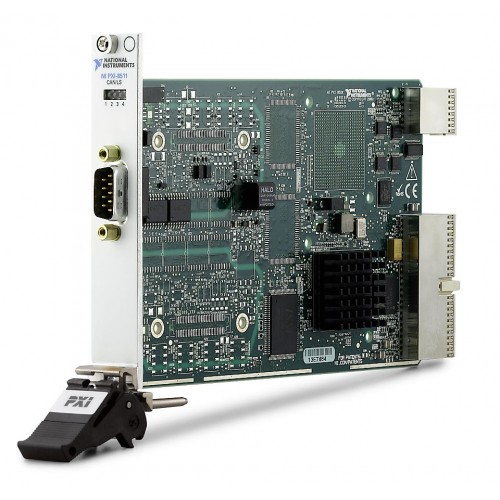
NI (National Instruments) PXI-8511 1- or 2-Port, Low-Speed/Fault Tolerant PXI CAN Interface Module
1 image: Click to enlarge
NI (National Instruments) · PXI Hybrid

PXI-8511

The NI PXI-8511 is a low-speed/fault-tolerant PXI CAN interface module offered in 1- and 2-port configurations. It supports a maximum baud rate of 125 kbits/s and external timing and triggering.

ManufacturerNI (National Instruments)
ModelPXI-8511
Part Number780686-02 · 780686-01
Product Type1- or 2-Port, Low-Speed/Fault Tolerant PXI CAN Interface Module
● Available to Order
Condition: confirmed per unit

Request current pricing and lead time for this model. Our team will confirm the exact equipment configuration and condition.

Fast RFQ

Quote: PXI-8511

We will reply by email.
Free Shippingfull policy linked
30-Day Warrantystandard coverage
30-Day Returnspolicy applies
Technical Supportmodel & compatibility help
CAN Physical LayerLow-Speed/Fault Tolerant
Supports External Timing And TriggeringYes
Bus ConnectionPXI Hybrid
Operating Temperature Range0 °C to 55 °C
Maximum Baud Rate125 kbits/s
SOHO Assistant
Ask about this exact model, a replacement, accessory, driver, rental or repair question.
Ask about specifications, compatibility, availability, rental or repair.
Ask SOHO Assistant
Overview

Product overview

Key product information and technical features.

The PXI-8511 provides a low-speed/fault-tolerant Controller Area Network interface for applications developed with the NI-XNET driver. It connects through PXI Hybrid and supports external timing and triggering.

The model family includes the 1-port configuration, part number 780686-01, and the 2-port configuration, part number 780686-02. Confirm the part number when selecting the required port count.

  • Low-speed/fault-tolerant CAN physical layer.
  • Maximum baud rate of 125 kbits/s.
  • Supports external timing and triggering.
  • NI-XNET device-driven DMA engine transfers CAN frames and signals between the interface and user program without CPU interrupts.
  • Operating temperature range of 0 °C to 55 °C.
  • Enclosed design without conformal coating.
Verified specifications

Technical data

Verified product specifications.

CAN Physical LayerLow-Speed/Fault Tolerant
Supports External Timing And TriggeringYes
Bus ConnectionPXI Hybrid
Operating Temperature Range0 °C to 55 °C
Maximum Baud Rate125 kbits/s
Conformal CoatedNo
EnclosedYes
NI part numbers780686-02, 780686-01
Condition & included items

What the actual unit includes

Confirm condition, included accessories and revision before ordering.

Condition

Confirmed per unit.

Included

Device / accessories confirmed in quote.

Revision

Exact revision confirmed when relevant.

Compatibility

Complete the measurement chain

Review system components and compatibility requirements.

NI

Manufacturer

PXI Hybrid

Bus Connection

PXI-8511

This product

Platform shown as listed by NI. Confirm controller, chassis and software fit for your system with NI before integration.
Manuals & software

Technical resources

Manuals, software and technical resources for this model.

Shipping, warranty & returns

Commercial terms

Review shipping, warranty and return terms before ordering.

Shipping
Free Shipping. Full policy terms apply.
Warranty
30-Day Warranty. Standard coverage applies.
Returns
30-Day Returns. Return policy applies.
Price / Availability
Contact SOHO ProLab for current quote and availability.
Lifecycle services

Source, rent or repair the exact model

Choose pricing, rental or repair for this exact model.

FAQ

Product-specific questions

Product-specific answers based on available technical information.

What CAN physical layer does the PXI-8511 use?

It uses a low-speed/fault-tolerant CAN physical layer with a maximum baud rate of 125 kbits/s.

Does the PXI-8511 support external timing and triggering?

Yes. The previously verified structured specifications identify external timing and triggering as supported.

Which driver environment does the PXI-8511 use?

The PXI-8511 is intended for application development with the NI-XNET driver. Check the driver documentation for requirements applicable to your software environment.

Ask SOHO AssistantProduct & compatibility help