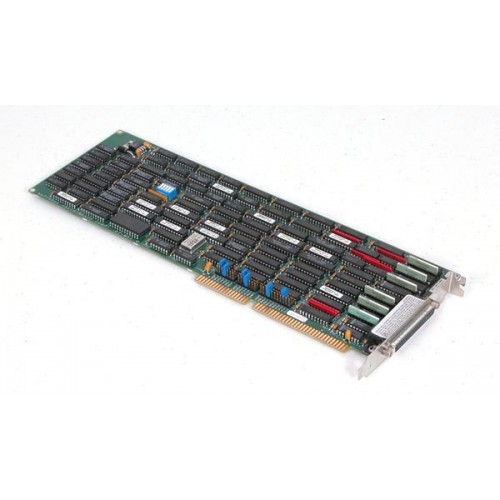
National Instruments AT-MXI Legacy VXI interface board
1 image: Click to enlarge
National Instruments · VXI

AT-MXI

The National Instruments AT-MXI is a legacy interface board used with NI-VXI for VXI I/O access. Its configuration uses hardware jumpers and software resource settings rather than plug-and-play allocation.

ManufacturerNational Instruments
ModelAT-MXI
Product TypeLegacy VXI interface board
● Available to Order
Condition: confirmed per unit

Request current pricing and lead time for this model. Our team will confirm the exact equipment configuration and condition.

Fast RFQ

Quote: AT-MXI

We will reply by email.
Free Shippingfull policy linked
30-Day Warrantystandard coverage
30-Day Returnspolicy applies
Technical Supportmodel & compatibility help
ModelAT-MXI
ConfigurationNon-plug-and-play; hardware jumpers and VXIedit settings
Default interruptIRQ 12
Default DMA channel3
SOHO Assistant
Ask about this exact model, a replacement, accessory, driver, rental or repair question.
Ask about specifications, compatibility, availability, rental or repair.
Ask SOHO Assistant
Overview

Product overview

Key product information and technical features.

The AT-MXI belongs to National Instruments' legacy MXI interface hardware for VXI systems. NI's archived Windows 95 upgrade notes explicitly identify this board and document its system-resource configuration.

For the documented Windows 95 installation, the resources used by the 16-bit NI-VXI driver must be reserved manually. If the board's defaults have been changed, the reserved resources must match both the hardware jumper positions and the VXIedit configuration.

  • Documented NI-VXI interface hardware for legacy VXI I/O access.
  • Hardware-jumper configuration coordinated with the NI-VXI VXIedit utility.
  • Manufacturer-documented defaults for I/O addresses, interrupt, DMA channel, and memory window.
Verified specifications

Technical data

Verified product specifications.

Plug-and-playNo
Default I/O address range0x0340–0x035F
Default interrupt12 IRQ
Default DMA channel3
Default memory address range0x000D0000–0x000DFFFF
Configuration utilityVXIedit
Condition & included items

What the actual unit includes

Confirm condition, included accessories and revision before ordering.

Condition

Confirmed per unit.

Included

Device / accessories confirmed in quote.

Revision

Exact revision confirmed when relevant.

Compatibility

Complete the measurement chain

Review system components and compatibility requirements.

National Instruments

Manufacturer

NI-VXI

Driver and configuration environment

AT-MXI

Legacy VXI interface board

Windows 95 configuration

Reserve the driver's system resources manually and match them to the board jumpers and VXIedit settings.

Use AT-MXI-specific documentation; the cited release notes direct AT-MXI-2 users to separate kit documentation.
Manuals & software

Technical resources

Manuals, software and technical resources for this model.

Shipping, warranty & returns

Commercial terms

Review shipping, warranty and return terms before ordering.

Shipping
Free Shipping. Full policy terms apply.
Warranty
30-Day Warranty. Standard coverage applies.
Returns
30-Day Returns. Return policy applies.
Price / Availability
Contact SOHO ProLab for current quote and availability.
Lifecycle services

Source, rent or repair the exact model

Choose pricing, rental or repair for this exact model.

FAQ

Product-specific questions

Product-specific answers based on available technical information.

Is the AT-MXI a plug-and-play board?

No. NI's Windows 95 release notes identify it as non-plug-and-play and require manual reservation of the resources used by its driver.

What are the documented default system resources?

NI lists I/O addresses 0x0340–0x035F, IRQ 12, DMA channel 3, and memory addresses 0x000D0000–0x000DFFFF. These are defaults, not confirmation of an individual board's jumper settings.

What must match when changing AT-MXI resource settings?

The reserved system resources must match both the board's hardware jumper settings and the NI-VXI VXIedit configuration.

Ask SOHO AssistantProduct & compatibility help