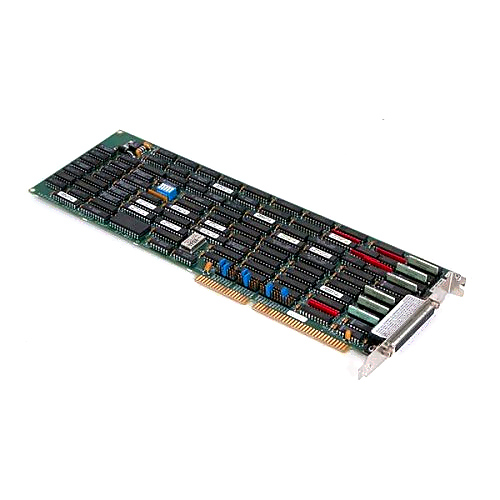
AT-MXI
1 image: Click to enlarge
National Instruments · VXI

AT-MXI

The National Instruments AT-MXI is a legacy interface board used with NI-VXI for VXI I/O access. Its configuration uses hardware jumpers and software resource settings rather than plug-and-play allocation.

ManufacturerNational Instruments
ModelAT-MXI
Product TypeLegacy VXI interface board
● Available to Order
Condition: confirmed per unit

Request current pricing and lead time for this model. Our team will confirm the exact equipment configuration and condition.

Fast RFQ

Quote: AT-MXI

We will reply by email.
Free Shippingfull policy linked
30-Day Warrantystandard coverage
30-Day Returnspolicy applies
Technical Supportmodel & compatibility help
ModelAT-MXI
ConfigurationNon-plug-and-play; hardware jumpers and VXIedit settings
Default interruptIRQ 12
Default DMA channel3
SOHO Assistant
Ask about this exact model, a replacement, accessory, driver, rental or repair question.
Ask about specifications, compatibility, availability, rental or repair.
Ask SOHO Assistant
Overview

Product overview

Key product information and technical features.

The AT-MXI belongs to National Instruments' legacy MXI interface hardware for VXI systems. NI's archived Windows 95 upgrade notes explicitly identify this board and document its system-resource configuration.

For the documented Windows 95 installation, the resources used by the 16-bit NI-VXI driver must be reserved manually. If the board's defaults have been changed, the reserved resources must match both the hardware jumper positions and the VXIedit configuration.

  • Documented NI-VXI interface hardware for legacy VXI I/O access.
  • Hardware-jumper configuration coordinated with the NI-VXI VXIedit utility.
  • Manufacturer-documented defaults for I/O addresses, interrupt, DMA channel, and memory window.
Verified specifications

Technical data

Verified product specifications.

Plug-and-playNo
Default I/O address range0x0340–0x035F
Default interrupt12 IRQ
Default DMA channel3
Default memory address range0x000D0000–0x000DFFFF
Configuration utilityVXIedit
Condition & included items

What the actual unit includes

Confirm condition, included accessories and revision before ordering.

Condition

Confirmed per unit.

Included

Device / accessories confirmed in quote.

Revision

Exact revision confirmed when relevant.

Compatibility

Complete the measurement chain

Review system components and compatibility requirements.

National Instruments

Manufacturer

NI-VXI

Driver and configuration environment

AT-MXI

Legacy VXI interface board

Windows 95 configuration

Reserve the driver's system resources manually and match them to the board jumpers and VXIedit settings.

Use AT-MXI-specific documentation; the cited release notes direct AT-MXI-2 users to separate kit documentation.
Manuals & software

Technical resources

Manuals, software and technical resources for this model.

Shipping, warranty & returns

Commercial terms

Review shipping, warranty and return terms before ordering.

Shipping
Free Shipping. Full policy terms apply.
Warranty
30-Day Warranty. Standard coverage applies.
Returns
30-Day Returns. Return policy applies.
Price / Availability
Contact SOHO ProLab for current quote and availability.
Lifecycle services

Source, rent or repair the exact model

Choose pricing, rental or repair for this exact model.

Explore equipment

Data Acquisition and Control Systems

Shipping, warranty and returns

FAQ

Product-specific questions

Product-specific answers based on available technical information.

Is the AT-MXI a plug-and-play board?

No. NI's Windows 95 release notes identify it as non-plug-and-play and require manual reservation of the resources used by its driver.

What are the documented default system resources?

NI lists I/O addresses 0x0340–0x035F, IRQ 12, DMA channel 3, and memory addresses 0x000D0000–0x000DFFFF. These are defaults, not confirmation of an individual board's jumper settings.

What must match when changing AT-MXI resource settings?

The reserved system resources must match both the board's hardware jumper settings and the NI-VXI VXIedit configuration.

Ask SOHO AssistantProduct & compatibility help