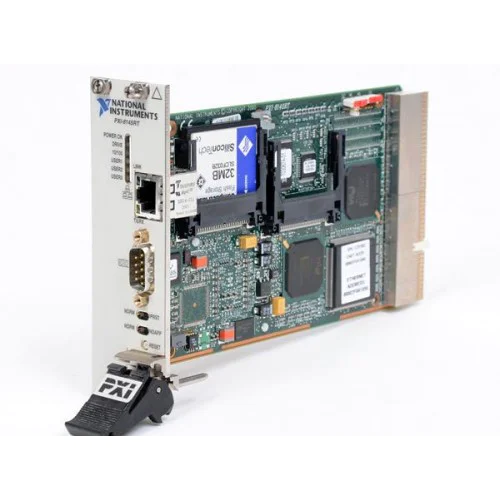
National Instruments PXI-8145RT Real-time embedded PXI controller
1 image: Click to enlarge
National Instruments · PXI

PXI-8145RT

The National Instruments PXI-8145RT is a real-time PXI controller with a 266 MHz Pentium processor. NI documents its use in a PXI-based motion-control and haptics research system.

ManufacturerNational Instruments
ModelPXI-8145RT
Product TypeReal-time embedded PXI controller
● Available to Order
Condition: confirmed per unit

Request current pricing and lead time for this model. Our team will confirm the exact equipment configuration and condition.

Fast RFQ

Quote: PXI-8145RT

We will reply by email.
Free Shippingfull policy linked
30-Day Warrantystandard coverage
30-Day Returnspolicy applies
Technical Supportmodel & compatibility help
Controller typeReal-time PXI controller
Processor266 MHz Pentium
Software platformPXI-814x RT listed under Phar Lap ETS
SOHO Assistant
Ask about this exact model, a replacement, accessory, driver, rental or repair question.
Ask about specifications, compatibility, availability, rental or repair.
Ask SOHO Assistant
Overview

Product overview

Key product information and technical features.

The PXI-8145RT provides embedded real-time control for PXI systems. An NI-hosted Georgia Tech application report identifies it as a 266 MHz Pentium RT controller in a slave-side haptics system using PXI motion-control and multifunction DAQ hardware.

Software selection requires attention to the PXI-814x RT support information. NI lists this controller family under Phar Lap ETS and specifies a W2 hardware-jumper requirement for upgrading its Real-Time software.

  • 266 MHz Pentium processor.
  • Real-time controller for the PXI platform.
  • PXI-814x RT family included in NI's LabVIEW Real-Time and LabWindows/CVI Real-Time support tables.
Verified specifications

Technical data

Verified product specifications.

Processor familyPentium
Processor clock frequency266 MHz
PlatformPXI
Real-time operating-system familyPhar Lap ETS; listed for PXI-814x RT
Condition & included items

What the actual unit includes

Confirm condition, included accessories and revision before ordering.

Condition

Confirmed per unit.

Included

Device / accessories confirmed in quote.

Revision

Exact revision confirmed when relevant.

Compatibility

Complete the measurement chain

Review system components and compatibility requirements.

National Instruments

Manufacturer

PXI

Modular instrumentation platform

PXI-8145RT

Real-time embedded controller

Real-Time software upgrades

NI specifies enabling the W2 hardware jumper when upgrading Real-Time software on PXI-814x RT controllers.

Confirm the required software version and W2 jumper procedure before upgrading the controller.
Manuals & software

Technical resources

Manuals, software and technical resources for this model.

Shipping, warranty & returns

Commercial terms

Review shipping, warranty and return terms before ordering.

Shipping
Free Shipping. Full policy terms apply.
Warranty
30-Day Warranty. Standard coverage applies.
Returns
30-Day Returns. Return policy applies.
Price / Availability
Contact SOHO ProLab for current quote and availability.
Lifecycle services

Source, rent or repair the exact model

Choose pricing, rental or repair for this exact model.

Explore equipment

PXI Platform

Shipping, warranty and returns

FAQ

Product-specific questions

Product-specific answers based on available technical information.

What processor does the PXI-8145RT use?

NI's application report identifies the PXI-8145RT as a 266 MHz Pentium real-time controller.

Where can I check Real-Time software support?

Consult NI's Real-Time Module support table under PXI-814x RT. It lists LabVIEW Real-Time 6.0.3 with Target CD 2.0, or 6.1 without the Target CD, as the earliest supported versions. These entries do not establish the latest supported version.

Is there a hardware requirement for Real-Time software upgrades?

Yes. NI states that the W2 hardware jumper must be enabled to upgrade Real-Time software on PXI-814x RT controllers. Follow the applicable controller documentation before changing jumper settings.

Ask SOHO AssistantProduct & compatibility help